Create Your Own ChatGPT: The Complete Guide to Customizing a GPT with Your Rules and Style

Imagine having an AI assistant with your tone, style, and goals. With the latest ChatGPT features, it’s now possible to create custom GPT models tailored specifically to you — no coding required.
From content creation to productivity and automation, creating a custom GPT unlocks an entirely new level of interaction. In this complete guide, you’ll learn how to create a custom GPT, define its behavior, and make it truly useful in your routine.
Why create a custom GPT?
To create a custom GPT means shaping how the AI thinks, talks, and acts. Instead of a general-purpose assistant, you’ll get one trained to follow your tone, workflows, and objectives.
Whether you’re looking for a blog writer, customer service bot, project manager, or study coach, a custom GPT can deliver tailored solutions and scale with your goals.
What you need to get started
Before creating a custom GPT, make sure you have:
- An active ChatGPT Plus account with GPT-4o access
- Access to the “Explore GPTs” section on chat.openai.com
- A clear use case or objective for your GPT (e.g., SEO writer, legal assistant, productivity coach)
Step-by-step: how to create a custom GPT
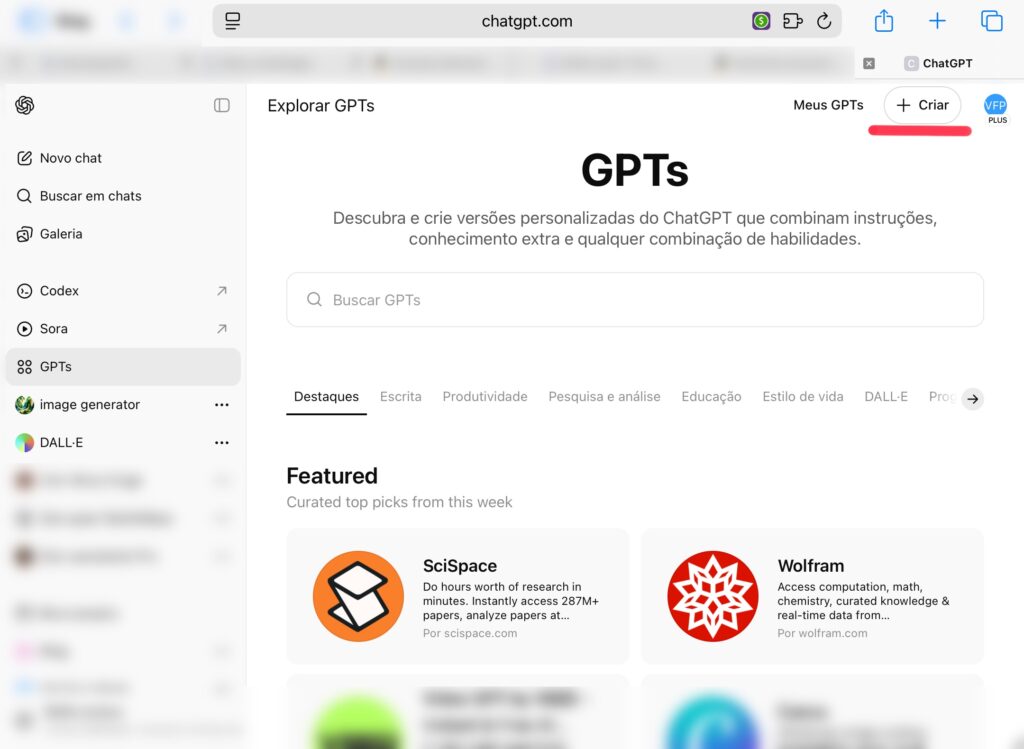
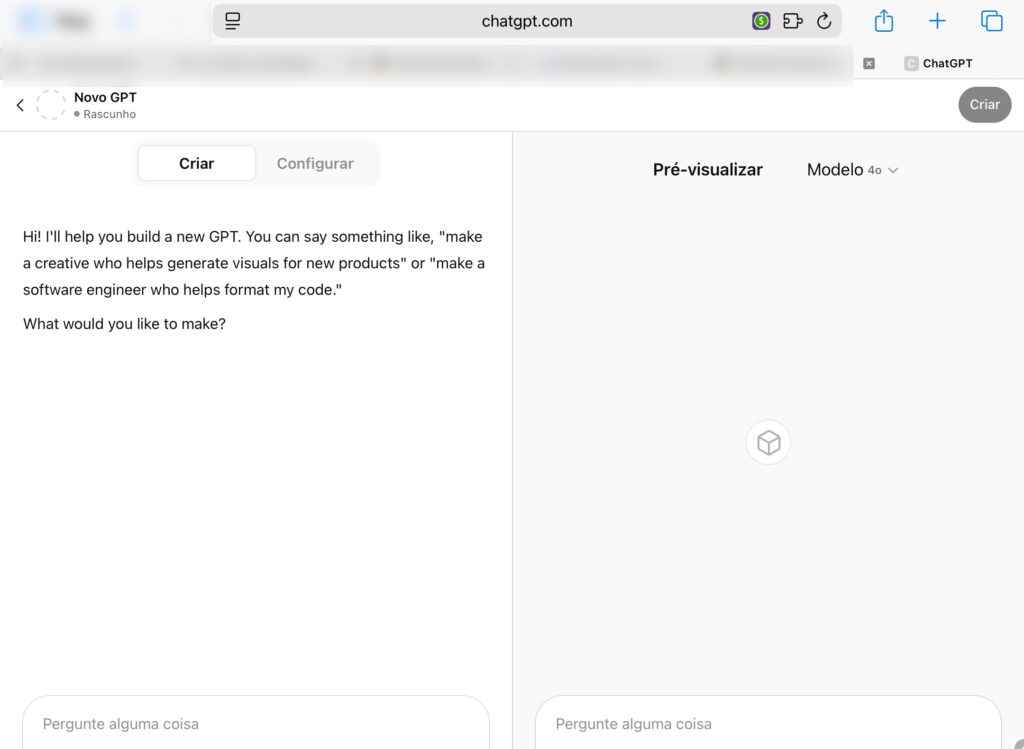
Follow these steps to create a custom GPT in minutes:
- Go to “Explore GPTs” in the left-hand menu
- Click “Create a GPT” in the top right
- Name your GPT and upload an avatar image
- Add a short description that explains its purpose
- In the “Instructions” field, define its behavior, tone, restrictions, and goals
- Optionally, upload reference files, URLs, or APIs for context
- Review your settings and click “Save and Publish”
How to write good instructions for your GPT
Success when you create a custom GPT depends on clear, detailed instructions. Be specific and purposeful. For example:
- “You are a copywriter with a human tone and friendly language.”
- “Avoid repetitive words, use short lists, keep it clear and engaging.”
- “Never invent data or provide information without a clear source.”
Customizing with files and links
One of the biggest advantages when you create a custom GPT is the ability to attach PDFs, documents, or public URLs as knowledge sources.
You can upload a product manual, company policy, or blog archive — and your GPT will use that to give smarter, more contextual responses.
Custom GPTs with Actions: connect APIs and Webhooks
Advanced users can create a custom GPT with actions — enabling it to connect with external systems like Google Sheets, CRMs, or Notion via APIs and webhooks.
This allows for live data queries, task automation, content generation, and even voice assistant integration.
Use cases for custom GPTs
Here are some real-world applications when you create a custom GPT:
- Legal advisor trained on updated legislation
- Study planner that delivers daily schedules based on your goals
- SEO-focused blog writer with content calendar automation
- Sales assistant with persuasive copywriting and customer analysis
- Customer support bot with brand voice and knowledge base
Limitations and precautions
Even though it’s powerful to create a custom GPT, keep these considerations in mind:
- Not all uploaded files will be interpreted perfectly
- Always review AI-generated responses before publishing
- Do not include private or sensitive information
How to share and use your GPT
Once you create a custom GPT, you can share a public link, embed it on a site, or use it directly inside your OpenAI account. Collect feedback and iterate based on real-world use.
Conclusion
Customizing a ChatGPT is a game-changer for those who want more from AI. Whether you’re aiming for better productivity, automation, or personalized interaction, when you create a custom GPT, you take control of your digital assistant like never before.
Start now and unlock a new level of intelligent support — tailored just for you.
💡 Call to Action
🚀 Want your own GPT tailored to your goals and tone? Create your GPT now and experience the next evolution of personal AI. Need help with instructions? Reach out!
FAQ
- Do I need to code? No. The interface is entirely no-code and user-friendly.
- Does it work on the free plan? No. You’ll need the Plus plan with GPT-4o access.
- Can I connect it to APIs? Yes. GPTs with Actions can call external APIs and services.
- Can I upload my own files? Yes. PDFs and documents are supported as memory.
- Is there a limit on how many GPTs I can create? Not officially. You can create multiple GPTs as needed.
Want to dive deeper into this topic? Check out the Guide on Automating Tasks with AI and the Article on How to Boost Productivity with AI.
You can also visit the official OpenAI GPTs customization page to explore the tool directly.